The Perfect Privacy & Productivity
After years of testing browser extensions, I’ve settled on three absolute essentials that cover all my needs: Privacy Badger for tracking protection, AdGuard for ad blocking, and Immersive Translate for bilingual reading. What makes this combination special is that each extension excels in its niche while working perfectly together.
All three are available for Firefox, Chrome, and Brave, but there’s one important setup tip: you’ll need to enable them for private/incognito windows (they’re disabled by default). Here’s why these extensions are worth installing:

1. Privacy Badger: Set-and-Forget Tracking Protection
Why It’s Special
Privacy Badger stands out because it works perfectly right after installation – no complicated settings, filter lists, or customization needed. Unlike other privacy tools that require constant tweaking, Privacy Badger’s can run automatically:
✔ Blocks invisible trackers (cookies, fingerprinting, etc.)
✔ Auto-learns new tracking methods
✔ Open-source & privacy-respecting
✔ Lightweight and non-intrusive
It’s the most low-maintenance privacy solution available.
How to Enable in Private Browsing
- Right-click the extension icon → Manage Extension
- Toggle “Allow in Private Windows” (Firefox) or “Allow in incognito” (Chrome/Brave)
🔗 Get it here: https://privacybadger.org

2. AdGuard: The Only Ad Blocker That Works Everywhere
Ad Blocking That Works
After extensively testing every major ad blocker on the market, I can confidently say AdGuard stands alone as the only solution that consistently and reliably blocks all forms of disruptive advertising.
What truly sets AdGuard apart is its unparalleled effectiveness against YouTube’s notoriously stubborn ads – it seamlessly eliminates both pre-roll video ads that interrupt your viewing and those frustrating mid-roll interruptions that break up longer content.
Beyond YouTube, AdGuard’s powerful filtering extends to removing banner ads across all websites and even tackles the challenging ads on platforms like Twitch streams and Spotify’s web player, where most other ad blockers fail completely. This comprehensive coverage across multiple platforms makes AdGuard the single most effective ad-blocking solution available today.
Other blockers either fail or require complicated filter lists – AdGuard just works.
Additional Benefits:
✔ Removes all website ads (including sneaky ones)
✔ Blocks malvertising and scam popups
✔ Lightweight (unlike some memory-heavy blockers)
How to Enable in Private Browsing
- Right-click AdGuard → Manage Extension
- Enable “Allow in incognito” (Chrome/Brave) or “Run in Private Windows” (Firefox)
🔗 Get it here: https://adguard.com
3. Immersive Translate: Read Anything in Any Language
Why It’s a Game-Changer
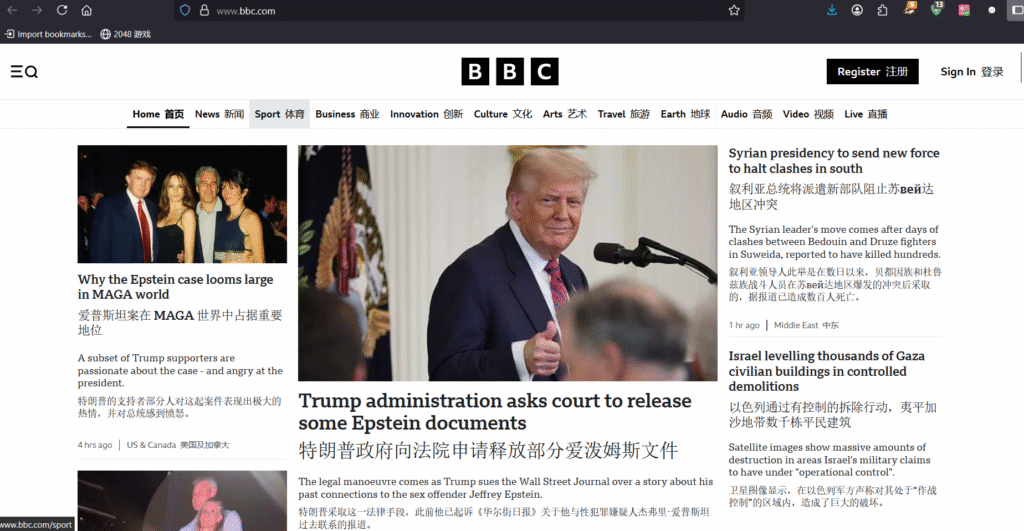
This extension provides side-by-side translations, making it perfect for language learners or anyone reading foreign content.
✔ Dual-language display (original + translation)
✔ Works on PDFs, eBooks, and subtitles
✔ Supports 10+ translation engines (Google, DeepL, ChatGPT)
✔ Customizable hotkeys & UI (change font, colors, layout)
Why It Beats Google Translate
This extension shows original text and translation side-by-side, perfect for:
- Language learners
- Researching foreign sources
- Reading PDFs/eBooks in other languages
How to Enable in Private Browsing
- Right-click the extension → Manage Extension
- Turn on “Allow in incognito” (Chrome/Brave) or “Run in Private Windows” (Firefox)
🔗 Get it here: https://immersivetranslate.com

Why This Combination Works So Well
- Privacy Badger handles tracking protection automatically
- AdGuard takes care of all ads (especially YouTube)
- Immersive Translate removes language barriers
All three:
✅ Are lightweight
✅ Don’t slow down browsing
✅ Work across Chrome, Firefox and Brave
Pro Tip: After installing, test them on YouTube, news sites, and foreign language pages to see the difference immediately!
Which of these extensions do you find most useful? Have any other favorites that complement these? Let’s discuss in the comments! 🚀